How to Write Lyrics for an AI Song Generator
By FlowTiva · September 23, 2026 · Tutorials & Guides
An AI song generator does not read your lyrics the way a singer does. It reads a lyric sheet: part words to sing, part instructions about the song. Get the instructions right and the chorus lands where you want it; get them wrong and the model sings your stage directions out loud. This guide covers the conventions that work across today's lyric-based generators, with what we have learned from the 1,471 songs made on Flowtiva.
![A lyric sheet with colour-coded parts: section tags like [Verse 1] and [Chorus], a production note [Style – indie pop, 104 bpm], a backing vocal in parentheses, and a 'Lyrics:' label crossed out; beside it, the clean lyrics a listener reads.](/storage/blog/images/2026/ai-lyric-sheet-anatomy.webp)
1. Mark every section in square brackets
Square brackets are the structure. Most lyric-based generators read [Intro], [Verse], [Pre-Chorus], [Chorus], [Bridge] and [Outro] as cues for where the energy rises, where a hook repeats and where the song ends. Without them the model has to guess, and it often guesses a song with no clear chorus.
Creators have figured this out: in our catalogue, 77% of lyric sheets mark their verses, 75% a chorus and 60% a bridge. A reliable skeleton for a three-minute song looks like this:
[Intro]
[Verse 1]
[Pre-Chorus]
[Chorus]
[Verse 2]
[Pre-Chorus]
[Chorus]
[Bridge]
[Final Chorus]
[Outro]
Number your verses ([Verse 1], [Verse 2]) and repeat the chorus in full each time it comes back, rather than writing "repeat chorus". The generator sings what is on the page.
2. Keep production notes inside the tags
You can steer the sound of a section from its tag: [Verse – palm-muted riff, half time] or [Bridge – just piano]. Nearly half of the lyric sheets on Flowtiva do this. The rule that matters is where the note lives: inside the brackets it is an instruction; outside them it is a lyric. A line like slow and heavy, drop D tuning written on its own, without brackets, is text the model may try to sing.
The overall style (genre, tempo, instruments, mood) belongs in the style or description field of your generator, not at the top of the lyrics. On Flowtiva, custom mode has a separate Music Style and Mood box for exactly this.
3. Use parentheses for backing vocals
Parentheses usually become a second voice: an echo, an answer or an ad-lib.
Say it slow, say it once
Say you're coming home (coming home)
One in three lyric sheets on Flowtiva uses them, and they are the simplest way to make a chorus feel bigger. Keep them short (two to four words) and put them at the end of the line, where a backing singer would come in.
Some creators also write who sings the next part, such as (Female), (Male) or (Both). How well that works depends on the model, so treat it as a request rather than a guarantee. On Flowtiva, listeners never see those directions: they are removed from the lyrics people read and from the karaoke.
4. Leave out labels and headers
Do not start the sheet with Lyrics:, the song title or a note to yourself. Anything that is not in brackets is fair game to be sung, and a sung "Lyrics" at the top of a track is a classic first-attempt mistake.
5. Write lines you could actually sing
The median song on Flowtiva has 36 sung lines of about six words each. That is a useful target:
- Short lines. Six to eight words give the model room to phrase them. A 20-word line gets rushed.
- Four lines per verse, two to four per chorus. Choruses that repeat a short hook are the ones people remember.
- Consistent rhythm within a section. Lines of similar length inside a verse keep the melody from lurching.
- Rhyme helps, but it is optional. Near rhymes (door / before, home / alone) sound more natural than forced perfect ones.
6. Write in the language you want sung
Generators sing in the language of the lyrics, so write in it, including the accents. If you want a Spanish song, write canción, not cancion: small details like accented letters help an engine recognise the language with certainty on a short sheet. Mixing languages is possible too; a few Spanglish songs in our catalogue switch mid-verse on purpose.
7. Check the result, then keep the best take
Listen with the lyrics in front of you. On Flowtiva most songs come with synced lyrics, highlighted line by line as the song plays, which makes it easy to spot a line that got swallowed or a word the model mispronounced.
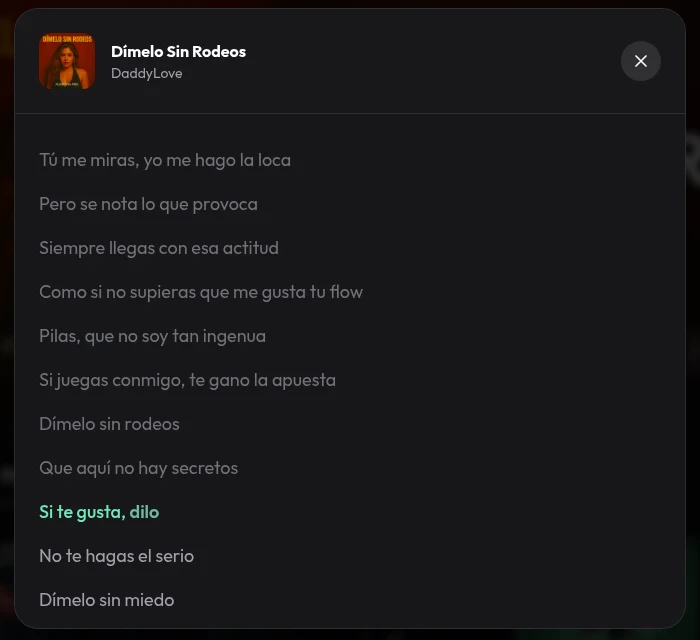
If a section does not work, change that section's tag or wording and generate again. Almost half the songs on Flowtiva are second takes, and most people publish only the one they like.
A complete example
[Verse 1]
I kept the porch light burning
Long after you had gone (gone)
The kettle learned your absence
The radio played on

[Pre-Chorus]
And every road I didn't take
Still knows my name

[Chorus]
Say it slow, say it once
Say you're coming home (coming home)
Say it slow, say it once
I won't leave the light alone

[Bridge – just piano, half time]
Every road I didn't take
Still knows my name

[Final Chorus]
Say it slow, say it once
Say you're coming home (coming home)
Put the genre, tempo and instruments in the style box ("warm indie pop, 104 bpm, soft synths, female vocal"), paste the sheet, and generate.
Cheat sheet. Brackets are structure. Notes go inside brackets. Parentheses are backing vocals. No labels. Short lines. Write in the language you want sung.
Ready to try it? Create a free Flowtiva account, choose Make music, and write your first sheet in custom mode.